Plan required training, guide each employee through completion, and review effectiveness with clear responsibilities and retained evidence. TrainNexa connects onboarding, controlled documents, learning and QA decisions in one application.
For testing laboratories, manufacturing teams and the people responsible for their training.
Start with the employee, induction and approved responsibilities.
New joinee induction
Coordinate onboarding across departments before creating the employee’s application login.
Create the employee profile with Employee ID, name, department, designation, qualification and joining date before login creation.
Assign multiple department induction tasks with individual responsible people and due dates; add or remove tasks with retained history.
Track pending, completed, overdue and late completion; record supporting evidence, remarks and controlled corrections.
Generate a numbered, versioned consolidated induction record and retain earlier PDF versions.
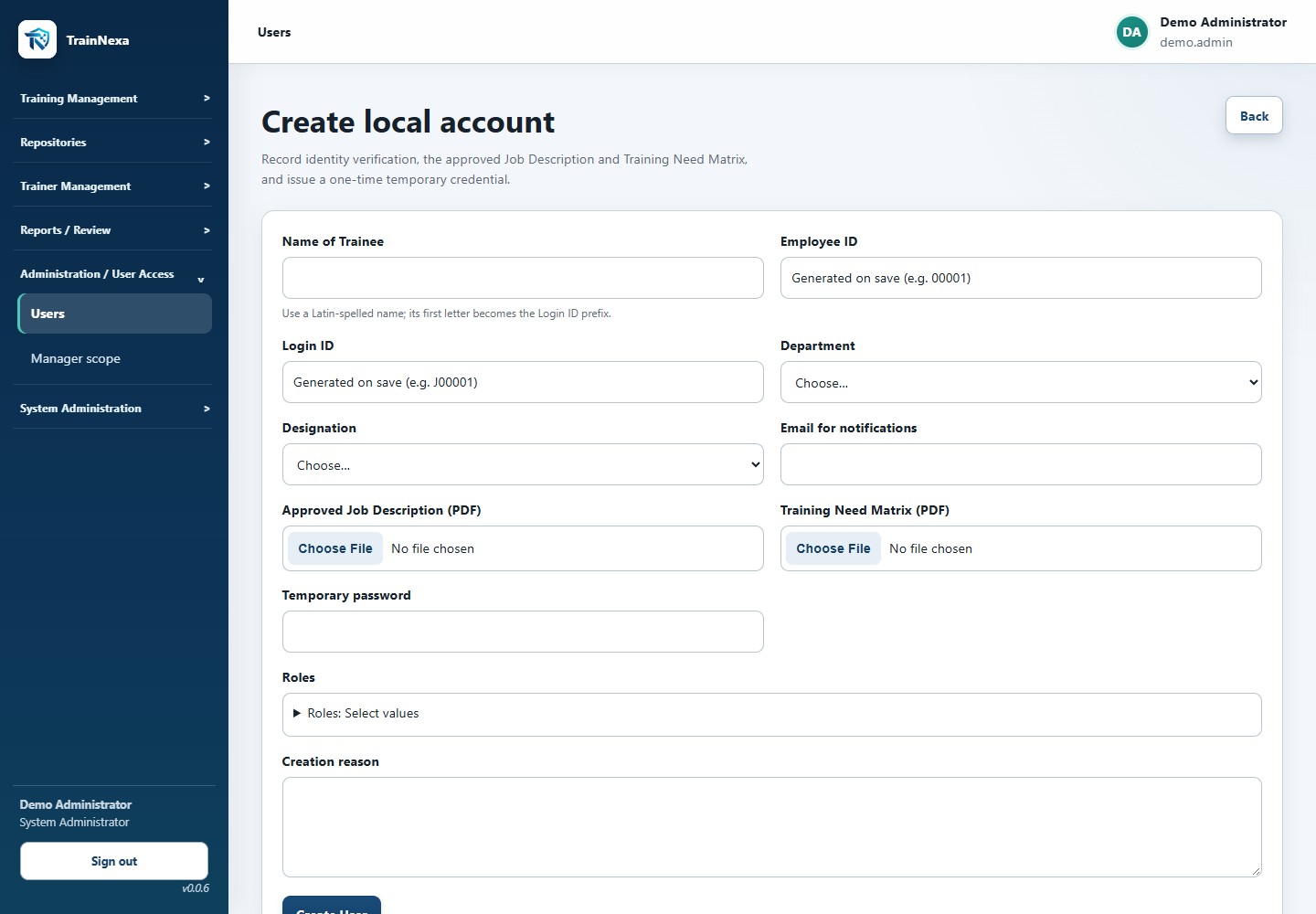
After induction completion, create the login with Mail ID, a controlled Designation and the selected application roles, plus the approved Job Description and Training Need Matrix PDFs.
Assign QA department induction to an eligible QA Manager or QA Head as well as other permitted department leaders.
Retain completed induction details and reports when the employee’s new login details are recorded.
Retained evidenceDepartment task history, supporting evidence and a consolidated induction record PDF.
Keep identity and controlled employee documents attributable throughout the account lifecycle.
Use unique normalized Employee IDs, login IDs, department and designation, with controlled Job Description PDFs.
Manage pending activation, active, locked and disabled accounts, temporary credentials, password reset and mandatory password change.
Retain append-only versions of personnel documents with checksum-verified authorized viewing and download.
Revoke sessions when access changes and retain user administration events.
Require separate Job Description and Training Need Matrix PDFs for new employee accounts through both account-creation paths; each matrix version is one PDF up to 10 MB.
View Training Need Matrix versions in Manage User and, with the same permitted document access, from the completed induction record. Later uploads require a reason and preserve earlier versions.
Keep existing accounts usable when no Training Need Matrix is recorded; do not invent or backfill a missing document.
Keep employee Designation separate from application roles; induction login creation uses the roles selected by the authorized creator.
Retained evidenceAccount history and retained Job Description, Training Need Matrix and Induction Training Record versions.
Control Technical Data Sheets and their accountable department through assignment and transfer.
Maintain TDS number, name and retained PDF versions with activation, retirement and authorized content access.
Assign department ownership with the receiving department’s business approval.
Transfer ownership using distinct current and receiving department approvers, approval references and retained history.
Create traceable TDS assignments and let trainees see their own assigned sheets in My TDS.
The first successful controlled print freezes and locks that TDS issue. Afterwards, the application offers View only and rejects another controlled print of the same issue.
A Manager/HOD can authorize a new linked issue through controlled reassignment/reissue, with a mandatory reason and electronic signature. The original stays locked.
Retained evidenceControlled TDS versions, receiving-department approval and ownership transfer history.
Explain why each person needs training and retain the original assignment conditions.
Assign to one or many authorized recipients with assessment required or not required, instructions and a due date.
Prevent duplicate open assignments and explain trainee-specific rejections when a bulk request cannot include everyone.
Retain the SOP version, trainee/profile information, approved question snapshot, assignment source and business reason.
Trace manual, curriculum, SOP revision, periodic, role change, deviation, CAPA, audit finding, incident, equipment change, return from absence, qualification expiry, planned schedule, session and TDS assignment sources.
Cancel unfinished work with a reason and retain linked replacement assignments rather than overwriting earlier cycles.
Use a permanent, readable ASM assignment number across training sources and linked TDS reissues. A genuinely new assignment receives a new number; reusing an obligation retains its number.
Show Function / Subject Area from the controlled source rather than asking the user to re-enter it.
Capture known trainee name, Designation and applicable application roles when a new assignment or replacement is created; keep earlier records unchanged.
Connect group delivery with each attendee’s individual completion requirements.
Record instructor-led, OJT, practical demonstration, external, workshop, self-study and blended delivery.
Use a controlled SOP or Other / Non-Master Document reference with subject area, time, venue, participants and supporting documents.
Select internal or external trainers whose authorization covers the subject area and training date.
Schedule sessions, change the trainer, amend details or cancel with retained evidence.
Close the session with an electronic signature and record the actual attendance and absence reasons for each planned trainee.
Apply individual acknowledgement and assessment criteria before individual completion; connect the correct EM obligation and avoid duplicate assignment/session obligations.
Retain completed-record corrections and produce a completed-session report/PDF with attendance, individual completion, assessment and EM summaries.
Keep the selected trainer out of the trainee list, including an external trainer linked to a system account.
For SOP training, link the exact-version SOP assignment to each attendee even when assessment and EM are both not required; individual work follows signed attendance and completion rules.
Record New Training, Retraining, Refresher Training or Revision / Change Training as a separate Training Requirement for SOP and Other-document sessions.
Keep make-up delivery linked to the specific earlier obligation when appropriate; independent repeat training remains separate.
Assess whether completed training works in practice, using a separate signed review.
Plan EM required or not required, method and due date; create tasks after the applicable individual training completion criteria.
Resolve responsibility from approved relationships and show Pending Owner Resolution when an authorized owner cannot be resolved.
Show only the logged-in responsible person’s own EM tasks in My EM Tasks, including pending, overdue and completed work. Broader reporting permission does not add other evaluators’ tasks to this personal queue.
Reassign open tasks with a reason or sign a controlled method change; preserve the task history.
Record conducted date, criteria, Effective / Not Effective outcome, remarks and optional supporting files through an electronic signature.
Require action details for Not Effective outcomes and allow controlled follow-up retraining through a linked assignment or session.
Completed EM is read-only for every role, for Effective and Not Effective outcomes alike. Keep the signed result and existing evidence without reopening it for correction.
Track each EM obligation with a permanent EM reference; keep owner changes and open-task method changes in its retained history.
Retained evidenceEM plan, obligation, responsible evaluator, signed outcome/evidence and linked follow-up.
Find the complete history and produce readable records for review.
Certificates and certificate register
Deliver a retained completion artifact with a clear approval history.
Issue a durable numbered PDF linked to confirmed training completion, trainee/SOP context, score, template version and approver.
Show the learner’s own certificates and an authorized searchable certificate register.
Verify the retained PDF checksum when delivered.
Reissue or revoke through a signed reasoned action and retain the earlier certificate artifacts.
Use controlled certificate numbering and the approved trainee identity, Designation, training reason and assessment wording. Preserve signed PDFs when profiles later change.
Retained evidenceNumbered PDF, template version, signature manifestation and prior artifact history.
Review required effectiveness work and its signed outcomes in one filtered report.
Include required EM obligations from completed assignment and session training, including Other / Non-Master Documents. Explicitly linked delivery is counted once.
Filter by department, EM status and EM due-date range, with optional trainee, training item, method and training-source filters.
See Pending, Overdue, Completed, unresolved-owner and EM Task Missing exceptions. Due today remains pending; cancelled tasks are excluded unless selected.
Show historical trainee and evaluator details, training completion, method, due/conducted dates, signed outcome and remarks. Missing or conflicting evidence remains Not recorded.
Use the same scoped data in the preview, printable A3 landscape PDF and inspection-package CSV; long remarks and supported Unicode names remain readable.
Retained evidenceConsistent preview, A3 landscape PDF and inspection-package CSV with permanent EM references.
Move from today’s work to the complete employee, SOP and training history.
Use trainee and Manager work summaries to identify due work and pending evaluation; an Auditor’s access follows review permissions.
Review the training matrix with assignment-owned Completed On dates, trainee history and SOP history.
Inspect failure/reassignment chains, certificate records, completed-session reports and the EM Trend view.
Generate the supported filtered readable PDF/CSV outputs and asynchronous owner-scoped export jobs.
Build inspection ZIP packages containing readable exports, stable identifiers, applied criteria and a file-size/checksum manifest.
Retain generated, failed, downloaded and expired export events and apply controlled artifact expiry.
Keep Training Source visible in the Training Matrix: distinguish manual SOP assignments, curriculum, planned schedule and session delivery while retaining the actual originating obligation.
Use a consistent Matrix layout for name, Designation, Employee ID, SOP/version, source, readable training reference, dates, trainer, assessment, reason and status.
Use recorded historical identity and explicitly linked trainer evidence. For manual SOP reading supported by a valid signed acknowledgement, display Self Study / N.A. regardless of assessment outcome; do not assume the assigner was the trainer.
Show Designation in Trainee History and Failures and Reassignments; remove Role from the SOP History display while retaining technical roles for traceability.
Retained evidenceFiltered reports, readable exports, stable record IDs and SHA-256 inspection manifests.
Use approved values consistently across people, training and review.
Control nine categories: Department, Designation, Training Type, Training Rule, Signature Meaning, Report Definition, Qualification, Function / Subject Area and Training Venue.
Prevent normalized duplicates and require reasons for controlled creation and retirement.
Preserve historical values and apply dependency restrictions; rename or reactivate supported subject areas and venues.
Connect subject areas to SOPs, trainer authorization and trainer-led session scheduling.
Retained evidenceApproved values, normalized uniqueness, controlled changes and historical use.
These captures come from the working application with synthetic demo people, documents and records. They show the actual interface rather than a product mockup.
Separate Job Description and Training Need Matrix uploads, Designation and selected roles.
Synthetic demonstration environment. Available screens and actions depend on the user’s approved permissions and scope.
A closer look / Effectiveness Monitoring
Two different questions. Two useful measures.
EM Coverage tells you whether required follow-up is complete. Effectiveness Rate tells you what the completed reviews found.
TRY AN ILLUSTRATIVE COHORT
Change the numbers to explore the formulas. This calculator is an illustration, separate from the application’s stored records.
EM Coverage
80.0%32 completed / 40 required
Effectiveness Rate
90.6%29 Effective / 32 completed outcomes
JAN
Training completed in January. EM reviewed in March. The result updates January’s cohort. Pending, overdue, Effective and Not Effective remain associated with the original training completion date.
MAR ↶
04 / A workspace for each responsibility
The right work. The right authority.
Role names help describe responsibilities. Explicit permissions and approved record scope determine what a person can actually see and do.
Trainee
Know the next action and the exact content
A personal workspace follows the learner through assigned training, reading, assessment and retained evidence.
Answer keys and unapproved automatic results remain protected.
My training and own history
Assigned SOP PDF, reading and rereading
Saved assessment drafts and final submission
Own session acknowledgements and My TDS
Approved results and own certificates
Trainer authorization is a controlled business record for internal or external trainers. It is distinct from granting a system permission role.
05 / Know what the record proves
Different decisions. Distinct evidence.
Keep these records connected while preserving the meaning of each decision.
01
Completion
The required individual training criteria and approved evaluation have been met.
02
Certificate
A retained, numbered artifact of approved completion, with issue and approval context.
03
Effectiveness
A subsequent signed review of whether the training is effective in practice.
04
Eligibility
The signed Instrumental / Chemical Analysis eligibility decision and Analyst Training Matrix.
05
Analyst eligibility
A separate QA decision supported by the Analyst Training Matrix and retained review history.
06
Trainer authorization
The approved subject scope, validity period and restrictions for delivering training.
Ready for a record review
Follow the evidence all the way through.
Review employee and SOP histories, submitted answer papers, signed decisions, certificate status and audit activity. Generate supported readable reports, filtered CSV exports and inspection ZIP packages with stable identifiers and a checksum manifest.
TrainNexa includes technical controls and operational tools to support your organization’s governed use of the system.
↗
Identity and access
Unique identities, password lifecycle, revocable sessions, permission roles and Manager scope. Administration and business approval remain distinct responsibilities.
≡
Record integrity
Immutable document versions, retained question snapshots, locked submitted responses, attributable signatures and append-only audit history.
↻
Operational evidence
Health, runtime, storage, host clock, export jobs, backup status, configuration fingerprints and signed maintenance mode.
⌘
Recovery and deployment
Encrypted complete-backup and restore scripts, checksum verification, HTTPS pilot ingress and controlled database migration/runbooks.
Site validation, infrastructure qualification, approved procedures, user training, business UAT and Quality/Security release approval are organization-specific activities. Software controls support that work; they do not establish a site’s regulatory compliance on their own.
Current scope and future readiness
A clear boundary for the next stage.
The application currently operates as a standalone training system. The repository also includes readiness plans and specification templates for interfaces, legacy migration, archive/readability, system retirement, privacy and supplier oversight.
HRMS, eDMS, QMS and identity-provider connectors, automated legacy migration and future integrations are not active product features. Their implementation is gated by approved requirements, ownership, reconciliation, security and validation decisions.
Practical questions
Before you plan your demonstration.
How do the three training matrices differ?
The Training Need Matrix is a personnel PDF attached to the employee account. The Analyst Training Matrix supports a QA eligibility request. The Training Matrix Report summarizes actual training assignments, sources, dates and outcomes. They serve different purposes.
Can a trainee print the same TDS issue again?
After the first controlled print, the issue is locked and the application provides View only. Another controlled issue requires a Manager/HOD reassignment or reissue with a reason and electronic signature. Viewing does not create a new issue; standard PDF viewer copy controls are separate from the application’s controlled-print record.
Whose work appears in My EM Tasks?
Only the logged-in responsible person’s EM tasks. Broader review uses the permitted EM register, EM Report or Training Management Summary. Completed EM results remain read-only for every role.
Does completed training automatically make someone qualified?
Training completion, effectiveness, analyst eligibility and trainer authorization are separate records. Analyst eligibility follows its own QA review and signed decision. New analyst qualification recording is no longer offered; earlier qualification records remain available as authorized history.
Can we train on content outside the SOP master?
Training sessions can reference Other / Non-Master Documents and retain supporting files and individual completion evidence. The controlled SOP and Qualification TDS repositories have their own document/version workflows.
Can an employee begin induction before receiving a login?
Yes. The employee profile and department induction tasks can be created before login. After induction completion, the authorized creator records Mail ID, Designation and selected roles and attaches the approved Job Description and Training Need Matrix PDFs before creating the login.
What happens when training or EM is unsuccessful?
A first confirmed assessment failure requires rereading before attempt two. A second failure closes the cycle for a fresh linked assignment. A Not Effective EM review records action details and can lead to a linked retraining assignment or session.
What should we prepare for a pilot?
Approve roles and scope, sample documents/question papers, induction and curriculum scenarios, trainer authorization and analyst eligibility criteria, certificate branding and operating procedures. Configure the hostname, mail and backups, then execute infrastructure qualification, recovery/workload checks and business UAT.
Is this product explorer connected to live application records?
No. This site presents product capabilities, illustrative scenarios and application captures using synthetic demonstration data. It does not authenticate to your training system or read its records.
Make the demonstration yours
A walkthrough with no missing steps.
Use this suggested sequence to review the product with training, Quality and IT stakeholders.
 TrainNexaPRODUCT EXPLORER